Communications
Last Updated: January 25, 2026
How We Communicate With You
MyFleet.Tech uses email, SMS text messages, and in-app notifications to keep you informed about job assignments, status changes, maintenance needs, and important updates. We never send marketing messages or sell your contact information.
Email Notifications
Email is our primary communication channel for detailed information that you may need to reference later.
Types of Emails We Send
Managing Email Preferences
- Unsubscribe Link: Every email includes an unsubscribe link at the bottom
- Notification Preferences: Fine-tune which emails you receive in your Notification Preferences
- Multiple Addresses: Route different notification types to different email addresses
- Email Digests: Bundle notifications into scheduled summaries instead of individual emails
SMS/Text Messages
SMS notifications provide time-sensitive alerts when you're away from the platform. You must opt in to receive SMS messages.
Opt-In Process
Users opt in to receive SMS notifications from MyFleet.Tech through one of the following methods:
1. Profile Settings
Enable or disable SMS notifications at any time in your Profile Settings by toggling the "Receive SMS notifications" option.
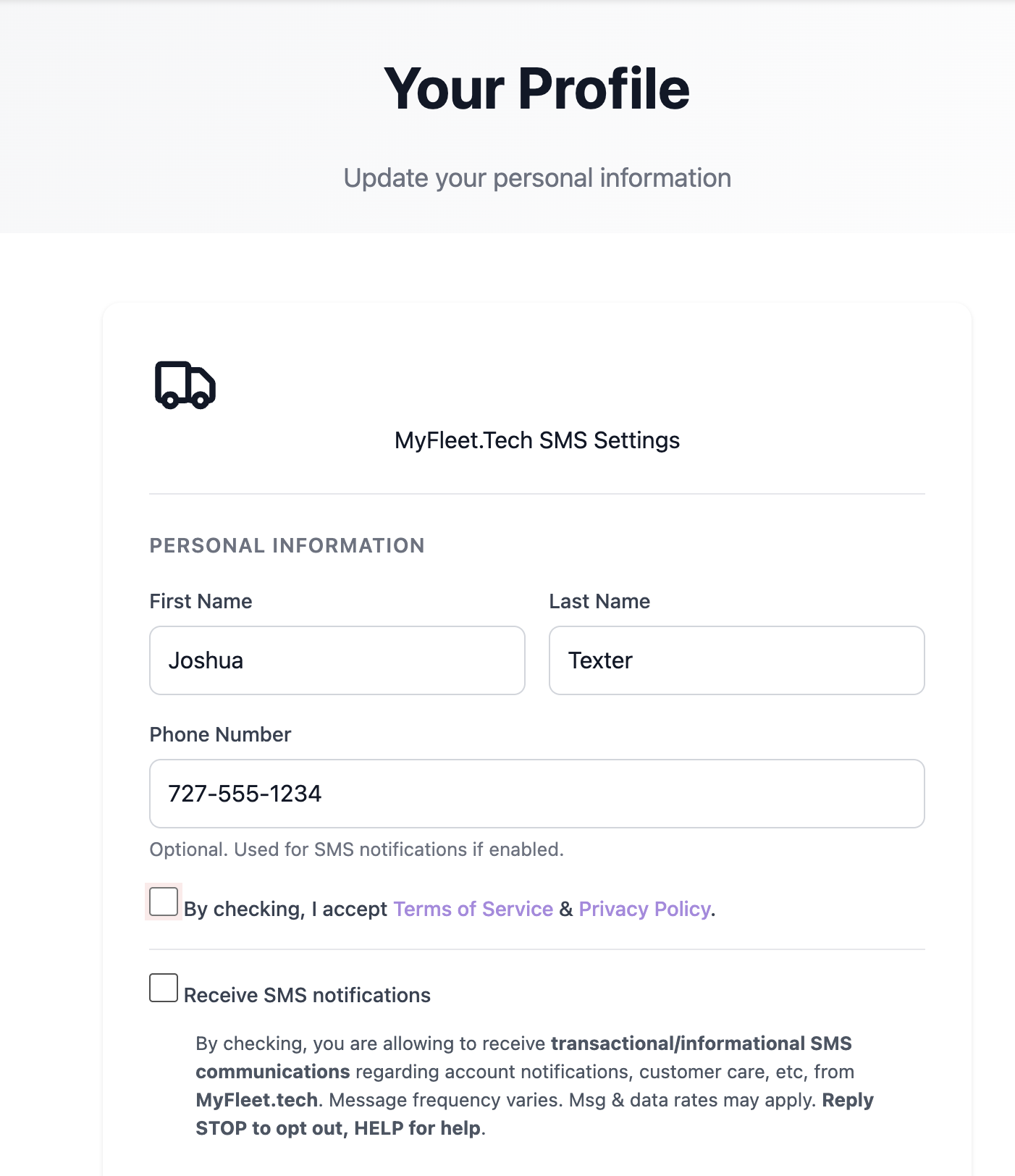
Screenshot: Personal SMS Settings with Terms acceptance and SMS opt-in checkboxes.
SMS Consent Disclosure
"By enabling SMS notifications, you agree to receive recurring automated text messages from MyFleet.Tech regarding job assignments, status updates, maintenance reminders, and service alerts. Message frequency varies based on your activity and role. Message and data rates may apply. Reply STOP to opt out at any time. Reply HELP for assistance. View our Privacy Policy and Terms of Service for more information."
Types of SMS Messages
SMS Message Frequency
Message frequency varies based on your role and activity level within the platform:
- Mechanics: Typically 2-10 messages per day during work hours
- Fleet Managers: Typically 5-20 messages per day based on fleet size
- Drivers: Typically 1-5 messages per day
SMS Costs
Supported Carriers
SMS notifications are supported on all major U.S. carriers including AT&T, Verizon, T-Mobile, Sprint, and most regional carriers. Some carriers may have messaging restrictions that could affect delivery.
In-App Notifications
In-app notifications appear within the MyFleet.Tech platform when you're logged in. They provide real-time updates without leaving the application.
Where Notifications Appear
- Notification Bell: Click the bell icon in the top navigation to see recent notifications
- Dashboard Alerts: Important items appear on your dashboard
- Badge Counts: Unread counts appear on menu items
Types of In-App Notifications
- Job assignments and status changes
- Comments and mentions from team members
- Approval requests (estimates, invoices)
- Asset issues and DVIR defects
- Maintenance reminders
- System announcements
Configure which in-app notifications you receive in your Notification Preferences.
Managing Your Preferences
You have full control over how MyFleet.Tech communicates with you:
Notification Preferences
Fine-tune each notification type by channel
Go to Notification Preferences →Reply STOP
Text STOP to (240) 693-5338 to unsubscribe from SMS
Unsubscribe from Emails
Click the unsubscribe link at the bottom of any email
Need Help?
If you need assistance with notifications:
- SMS: Text HELP to (240) 693-5338
- Email: support@myfleet.tech
- Phone: (240) 693-5338 (240-MYFLEET)
Privacy
Your contact information is protected under our Privacy Policy. We:
- Never sell or share your contact information with third parties for marketing
- Only use your information to send platform-related notifications
- Store your information securely with encryption
- Use Twilio as our SMS provider (see Twilio's Privacy Policy)
Contact Information
For questions about our communications, contact:
- MyFleet.Tech
- Email: support@myfleet.tech
- Phone: (240) 693-5338
- SMS Number: (240) 693-5338
Related Documents: